
Pick one

Three ways to annotate the same screenshot.

Same shot, same five points, three treatments. Tell me A, B or C and I will build the full walkthrough from it: the report explorer, the bulk revert, the restore preview and the scanner. Everything below is the real app from npm run dev, light theme.

Option A · Pins with floating labels

Most like the rest of the site, and the most "look at this" of the three. Labels sit on the screenshot at full width and fall back to the numbered list below 60em, because floating labels have nowhere to go on a phone.

Against it: The labels cover part of the app while they point at it, and the shot has to be busy enough to carry them without looking cluttered.
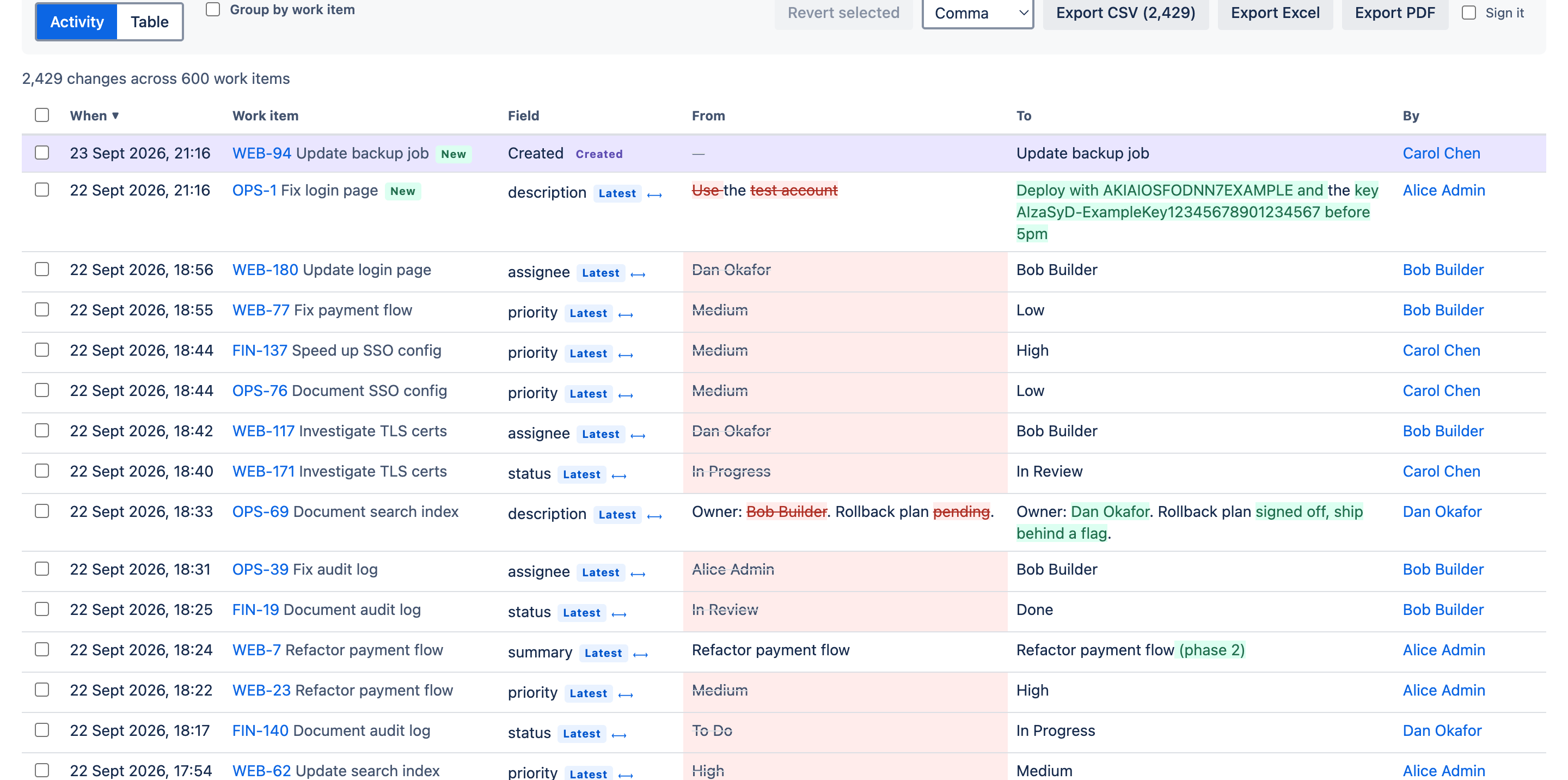
The UndoTrail report explorer, showing every field change across every project 1 Every project, one table 2,429 changes across 600 work items. Jira shows you one work item at a time. 2 The exact words that changed Not "description edited". The credential that went in, and the text that came out. 3 Still the current value? The Latest badge says this is what the field holds right now. 4 From, and to Both sides of every change, colour-coded, on custom fields as well as built-in ones. 5 And who did it A person, or an automation rule. The question that starts most of these searches.
  1. Every project, one table 2,429 changes across 600 work items. Jira shows you one work item at a time.
  2. The exact words that changed Not "description edited". The credential that went in, and the text that came out.
  3. Still the current value? The Latest badge says this is what the field holds right now.
  4. From, and to Both sides of every change, colour-coded, on custom fields as well as built-in ones.
  5. And who did it A person, or an automation rule. The question that starts most of these searches.
The Changes tab: every field change across every project, newest first.

Option B · Pins with a legend underneath

The screenshot stays untouched and readable, the captions sit in a grid below it. Identical on a phone and on a desktop, so nothing is ever hidden or reflowed away.

Against it: The reader has to look down and back up again to connect a number to a place.

The UndoTrail report explorer, showing every field change across every project 1 Every project, one table 2,429 changes across 600 work items. Jira shows you one work item at a time. 2 The exact words that changed Not "description edited". The credential that went in, and the text that came out. 3 Still the current value? The Latest badge says this is what the field holds right now. 4 From, and to Both sides of every change, colour-coded, on custom fields as well as built-in ones. 5 And who did it A person, or an automation rule. The question that starts most of these searches.
  1. Every project, one table 2,429 changes across 600 work items. Jira shows you one work item at a time.
  2. The exact words that changed Not "description edited". The credential that went in, and the text that came out.
  3. Still the current value? The Latest badge says this is what the field holds right now.
  4. From, and to Both sides of every change, colour-coded, on custom fields as well as built-in ones.
  5. And who did it A person, or an automation rule. The question that starts most of these searches.
The Changes tab: every field change across every project, newest first.

Option C · Pins plus zoomed crops

The only one where the detail is actually legible. A word-level diff is about 14px in a full-width screenshot; here each point gets its own zoomed card. Best for the leaked-key diff and the BULK badge, which are the two most convincing things in the product and the two smallest on screen.

Against it: Tallest of the three, and each crop needs its zoom tuned by eye.

The UndoTrail report explorer, showing every field change across every project 1 Every project, one table 2,429 changes across 600 work items. Jira shows you one work item at a time. 2 The exact words that changed Not "description edited". The credential that went in, and the text that came out. 3 Still the current value? The Latest badge says this is what the field holds right now. 4 From, and to Both sides of every change, colour-coded, on custom fields as well as built-in ones. 5 And who did it A person, or an automation rule. The question that starts most of these searches.

1 Every project, one table 2,429 changes across 600 work items. Jira shows you one work item at a time.

2 The exact words that changed Not "description edited". The credential that went in, and the text that came out.

3 Still the current value? The Latest badge says this is what the field holds right now.

4 From, and to Both sides of every change, colour-coded, on custom fields as well as built-in ones.

5 And who did it A person, or an automation rule. The question that starts most of these searches.

The Changes tab: every field change across every project, newest first.

The second shot, in the treatment I would pick

Bulk revert, annotated.

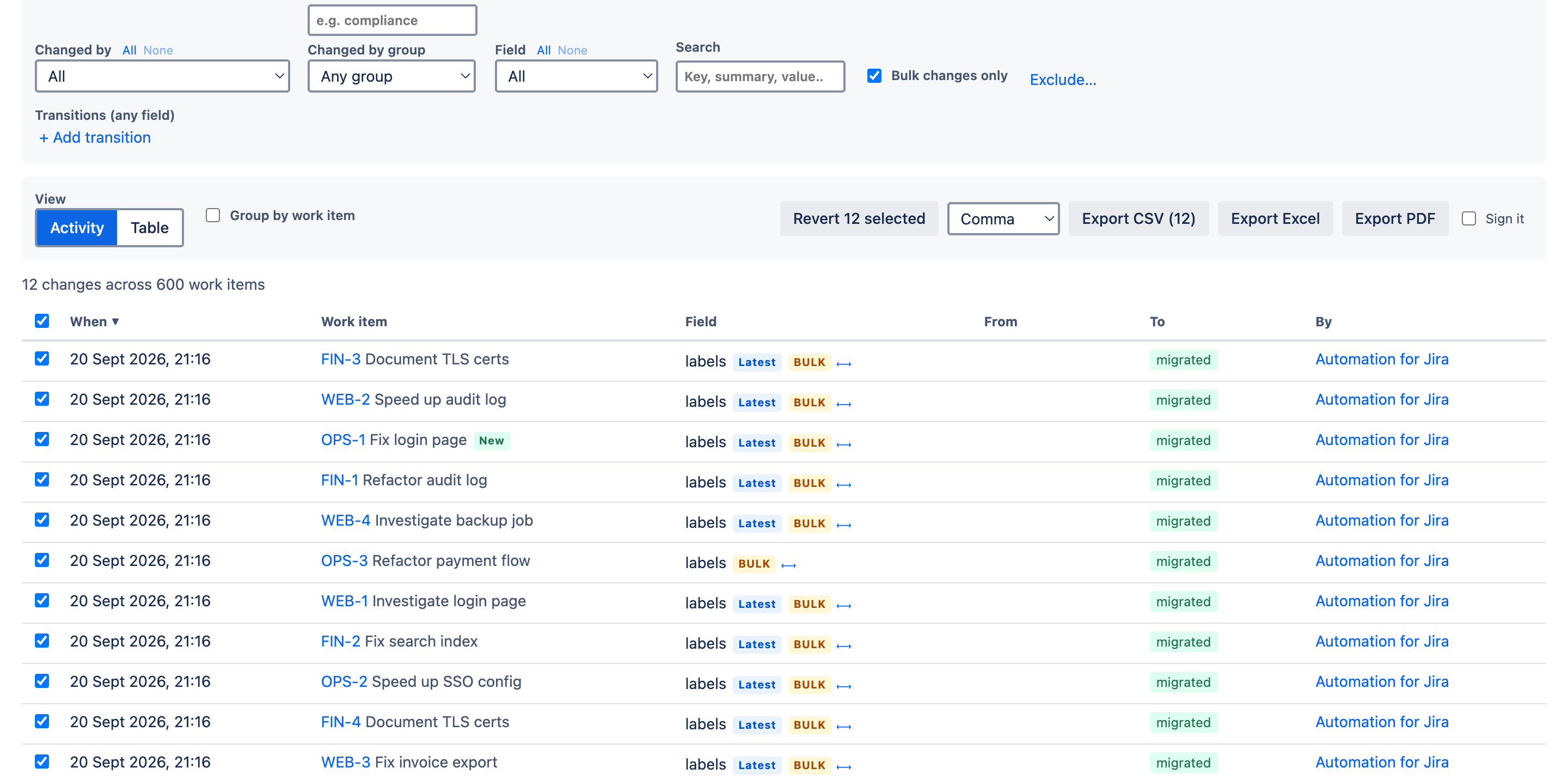
Option C on the revert screen, because the BULK badge and the button's count are the whole point and both are tiny in a full-width screenshot.

The report filtered to bulk changes only, with all twelve selected and revert armed 1 One filter isolates the robots Bulk changes only. 2,429 changes become the 12 an automation rule made. 2 Revert arms with a count Select the lot and the button tells you exactly how many it will write. 3 The BULK badge Carried by every change a rule or a bulk edit made, so human work is never mixed in. 4 Automation for Jira Named as the author, the same as a person would be.

1 One filter isolates the robots Bulk changes only. 2,429 changes become the 12 an automation rule made.

2 Revert arms with a count Select the lot and the button tells you exactly how many it will write.

3 The BULK badge Carried by every change a rule or a bulk edit made, so human work is never mixed in.

4 Automation for Jira Named as the author, the same as a person would be.

Bulk changes only, all twelve selected, revert armed with its count.